Real Guitar: acoustic electric
- 4.3
- Rating
- 50.00M
- Installs
- Free
- Price

 Analysis by App-foxy
I approached Real Guitar: acoustic electric as a pocket instrument rather than a conventional game. Its appeal is immediate: you tap strings, form chords, and experiment with songs without carrying a physical guitar. That makes it useful for a quick musical break, a beginner who wants to understand the layout of a guitar, or someone who simply enjoys making sound on a phone. After spending time with it, I found the experience more focused on accessible, casual playing than on replacing a real instrument.
The game comes from Kolb Apps and sits in the music category. It is free to start, rated for Everyone, and has grown into a very widely used app, with more than 50 million installs and an average rating of 4.3 from roughly 382 thousand ratings. Those figures suggest that it has reached far beyond guitar students; it is also being used by curious newcomers and people looking for a simple musical toy. The current version is 8.37.5, and it runs on Android 7.0 or later.
How comfortably can different people use it?
I look at comfort here as more than whether someone can tap the strings: screen size, touch accuracy, sound sensitivity, and the need to hold a phone all shape the experience. In my view, a stable surface and a relaxed pace can make the first try easier for many people, while anyone who needs large controls or strong tactile feedback may prefer another way to explore music. The next section considers how the app fits into ordinary routines.
You May Also Like

 AccuWeather: Weather Radar
AccuWeather Review: A Quick, Clear Forecast for Everyday Decisions
For everyday plans, the best forecast is the one you can understand quickly. AccuWeather makes rain timing, radar, and local conditions easy to act on, with a few trade-offs.

 Hill Climb Racing
Why Hill Climb Racing Still Turns Crashes Into One More Run
A tiny car, a bumpy hill and one more upgrade: Hill Climb Racing keeps resurfacing because its simple chaos makes every near-miss feel personal.

 AliExpress - Shopping App
AliExpress Makes Global Shopping Feel Personal, but Shoppers Bear the Risk
AliExpress turns a global marketplace into a pocket-sized discovery engine. Its reach is useful, its shopping loop compelling, and its trade-offs easy to miss.

 Lords Mobile: Kingdom Wars
Lords Mobile Is a Kingdom-Building Routine, Not a Quick Match
A case-by-case verdict on the building, battles, device demands, and social commitments that make Lords Mobile rewarding for some players and exhausting for others.

 PDF Scanner app - TapScanner
TapScanner Makes Paperwork Easier to Capture, Check, and Share
TapScanner makes scanning with a phone feel less like a rescue operation and more like a dependable step in getting work done. Its capture tools are useful, though not flawless.

 Block Blast!
 Shows How Much a Puzzle Game Can Leave Out
A quiet grid game shows why puzzle players increasingly value instant clarity, repeatable skill and low-pressure play—and where the genre still needs to catch up.
More From Our News Desk
View All News


Readability and navigation during a first session
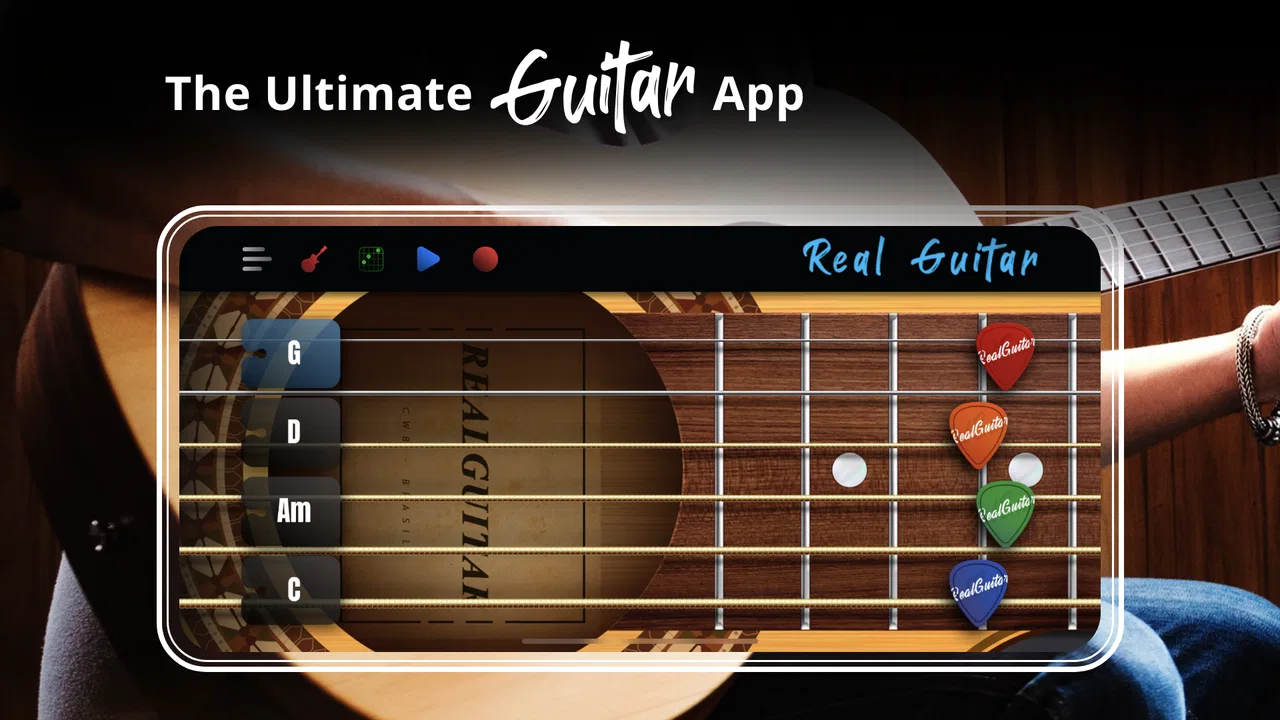
The strongest part of the experience is that the central idea is easy to understand. You open the app, see a guitar-style playing area, and can begin touching the strings. There is no need to learn a complicated control scheme before hearing a result. For a first-time user, that short path from launch to sound matters more than a long tutorial would.
The guitar layout also gives the screen a clear purpose. Instead of moving through several layers of menus before doing anything musical, the main interaction stays close to the instrument itself. I found that helpful when handing the phone to someone who had never tried a guitar app. A child, an older relative, or a complete beginner can usually understand the basic invitation: touch the strings and listen.
That simplicity has a trade-off. A real guitar communicates its shape through physical spacing, while a phone screen compresses everything into a small rectangle. On a larger display, the strings and controls are easier to separate visually. On a compact phone, the playing area can feel crowded, especially if you are trying to look at the screen and position several fingers at the same time. I would recommend beginning with the phone held steadily and the display brightness set to a comfortable level rather than trying to play while walking.
For people who rely on larger text or stronger visual contrast, the practical experience will depend heavily on the phone itself and on how comfortably the app’s interface appears on that device. I did not find the app difficult to understand conceptually, but its musical interaction is visual and touch-based. If small labels or closely placed controls are tiring to read, the app may require more concentration than its simple appearance suggests.
What the touch controls mean for motor comfort
Touch input removes one major barrier: you do not need the finger strength, calluses, or reach required by an acoustic guitar. That is a genuine advantage for beginners and for people whose hands make a full-size instrument uncomfortable. You can explore the idea of strumming without pressing metal strings against a fretboard, and you can stop instantly without worrying about dropping or repositioning a physical guitar.
At the same time, the screen does not remove all motor demands. Accurate playing still involves tapping or swiping in the right places, holding the device, and sometimes coordinating the hand that interacts with the strings with the hand that controls other parts of the interface. Users with limited reach, tremor, or difficulty making repeated precise touches may find quick patterns frustrating. A stylus might help some people with targeting, although the app is clearly designed around direct touch and the result may vary by device.
One useful approach is to treat it as a one-handed discovery tool before attempting more involved playing. Rest the phone on a table, use a relaxed finger, and focus on a single string or small area. This reduces the need to grip the device and makes it easier to notice whether the touch response feels comfortable. For someone introducing a child to music, that setup also keeps the activity calmer than asking the child to hold the phone in midair.
The app is better suited to short, repeatable gestures than to users who want the exact resistance of a guitar pick or string. That distinction is important. Its touch model can make music less physically demanding, but it cannot reproduce the tactile feedback that tells a guitarist how hard a string was struck. If developing hand strength and physical technique is the main goal, a real instrument or a structured guitar-learning tool is a better companion.
Sound, attention, and sensory context
Sound is the reason to use this game, and the immediate audio response makes experimentation rewarding. I could try a movement and hear the result without setting up an amplifier, tuning a guitar, or worrying about disturbing everyone in the room. Headphones can make the activity more private, while the phone’s volume control gives a straightforward way to keep the session manageable.
That convenience can also create sensory friction. Repeated string sounds may become tiring for people sensitive to sudden or layered audio, particularly when experimenting quickly. I would begin at a low volume and increase it only if necessary. The same advice applies when letting a child use it: the app is easy to start, so it is also easy to produce a lot of sound before anyone has adjusted the volume.
Visual attention matters as well. Playing asks you to watch a small interactive area, and that may be difficult for someone who cannot comfortably sustain near-screen focus. The app works best when the phone is placed at a stable distance and the user is not expected to divide attention between the instrument and another task. It is a poor choice for use while crossing streets, cycling, or doing anything that requires environmental awareness.
For users who learn through hearing rather than reading, the instant audio feedback is one of the most welcoming aspects. You can judge a gesture by listening instead of decoding a large amount of written instruction. For users who need strong visual or tactile confirmation, however, the lack of a physical string and fretboard means the phone offers less information through the hands. That makes it approachable in one sense and limited in another.
Using it in everyday situations
A realistic use case is a quiet ten-minute break when you are waiting for an appointment or relaxing at home. You can open the app, try a few patterns, and put it away without carrying extra equipment. It is also a practical way to occupy a beginner who is curious about guitar but is not ready to buy one. The low commitment lets that person discover whether touching strings and exploring chords is enjoyable before making a larger decision.
It can work well in a shared room if the volume is kept low or headphones are used. That is especially helpful for families with different schedules. One person can experiment without automatically turning the activity into a performance for everyone nearby. The same portable quality is useful for travel, although I would avoid relying on it in places where phone use is restricted or where the user needs to remain alert.
The free entry point makes casual testing easy, but the app includes in-app purchases ranging from $1.99 to $18.99 per item. I would treat those purchases as optional decisions rather than part of the basic reason to try it. Before paying, spend enough time with the free experience to decide whether the touch response and screen size suit your hands. A purchase cannot solve a fundamental mismatch between the app’s interface and your preferred way of learning.
Because the game is rated Everyone, it is positioned as a broadly approachable musical experience. That does not mean every child will find it equally comfortable or that every adult will find the controls effortless. Supervision is still sensible for younger users, particularly around volume, device handling, and purchases. The simple interface reduces the learning barrier, but it does not replace an adult’s judgment about how a particular child responds to screen time and sound.
Where it differs from a physical guitar and other options
Compared with an acoustic guitar, the app wins on portability, cost of entry, and physical effort. There is no instrument to tune, no bulky case, and no need to build tolerance for pressing strings. It is also less intimidating: a mistake disappears with the next tap, whereas a beginner may feel self-conscious when a real guitar produces an awkward chord.
The physical instrument wins on feedback and skill transfer. A real guitar teaches pressure, spacing, posture, picking control, and the relationship between hand movement and tone. Those lessons cannot be fully simulated by a flat touchscreen. If your goal is to perform with a guitar, use this app as a low-pressure introduction or practice reminder, not as your only training environment.
Compared with a conventional music-learning app, this game feels less like a course and more like an instrument sandbox. That is an advantage for people who dislike lessons and want immediate play. It is a disadvantage for anyone seeking a carefully sequenced curriculum, progress tracking, or detailed correction. A dedicated learning service will usually be the better choice when accountability and structured practice matter more than spontaneous exploration.
Compared with a basic virtual piano or rhythm game, the guitar format offers a more direct connection to strumming and chord shapes. However, it may be less forgiving for users who prefer large, isolated buttons or clear timing lanes. If your priority is tapping notes with minimal visual searching, another music game could feel more comfortable. Here, the reward comes from interacting with a guitar-like surface rather than following a highly guided rhythm interface.
Remaining barriers and practical workarounds
The biggest barrier is the screen itself. Phones vary widely in size, and the same interaction can feel relaxed on one device and cramped on another. A tablet-sized screen may be easier to see and target, while a small phone is more convenient to carry. I would test the main playing area before deciding whether the app is suitable for regular use, especially if precise touches are tiring.
Another limitation is the absence of physical resistance. Users with reduced touch sensitivity may not receive enough tactile information to know exactly where their finger landed. In that situation, watching the screen carefully and using slower gestures can help, but it will not create the feedback of real strings. This is a meaningful reason to choose a physical instrument, an external controller, or another music app with larger, more distinct controls.
Holding the device can also become uncomfortable during longer sessions. A stand or table support is a simple improvement, and it lets the user keep both hands relaxed. It also makes the app more accessible for someone who cannot maintain a firm grip. I found that short sessions were naturally more enjoyable than trying to treat the phone like a full practice instrument for an extended period.
There is a social barrier too. Someone may want to learn guitar but feel embarrassed about making mistakes in front of others. This app lowers that emotional cost because experimentation can happen privately. On the other hand, a person who needs encouragement, feedback, or a teacher may lose momentum when the experience is entirely self-directed. In that case, using the app alongside a friend, instructor, or simple practice plan is more effective than expecting the game to provide motivation by itself.
Finally, people should consider the difference between accessibility and completeness. Removing the need for a physical guitar makes the first step easier, but it does not make every musical task easy. The app supports casual sound-making and basic exploration particularly well; it is less convincing as a substitute for a full learning system, a rehearsal tool, or a performance setup. Knowing that boundary prevents disappointment.
My inclusive verdict
I recommend Real Guitar: acoustic electric to readers who want an approachable way to explore guitar sounds, especially if a full-size instrument is inconvenient, expensive, physically demanding, or socially intimidating. Its free starting point, Everyone rating, and straightforward touch interaction make it easy to try. The broad audience reflected by its roughly 7.5 thousand written reviews and strong install history is understandable: the app delivers a quick musical experience without asking for much preparation.
My recommendation is more cautious for users who need large, highly separated controls, strong tactile feedback, or a guided learning path. The app’s accessibility comes mainly from simplifying the instrument and removing physical strings, not from offering every possible way to interact. Device size, vision, motor control, hearing comfort, and the need for structured instruction will determine whether it feels genuinely usable.
For the best experience, I would place the phone on a stable surface, start with low volume, use headphones when appropriate, and begin with slow gestures rather than attempting complicated playing immediately. Give the free version enough time to reveal whether the screen and touch response suit you before considering an in-app purchase. If you want a private, low-pressure musical toy or a first taste of guitar interaction, Kolb Apps has made a convincing option. If you want to build transferable guitar technique, pair it with a real instrument or choose a dedicated course instead.
FAQs for Real Guitar: acoustic electric
01What features does Real Guitar offer for beginners?
Real Guitar is designed with beginners in mind, offering a tutorial mode that guides users through basic chords and strumming patterns. The app includes a wide range of chord diagrams and interactive lessons, making it easy for new players to learn at their own pace. Additionally, there are practice exercises to help reinforce learning.
02Can I use Real Guitar to play electric guitar sounds?
Yes, Real Guitar provides both acoustic and electric guitar sounds. Users can switch between different guitar types and styles, including classic electric, rock, and metal. The app offers high-quality sound samples that accurately replicate the experience of playing different guitars, enhancing the overall playing experience.
03Does Real Guitar support left-handed players?
Absolutely! Real Guitar includes a left-handed mode, making it accessible for left-handed musicians. This feature allows the fretboard and chord diagrams to be flipped, providing a more intuitive interface for left-handed users without compromising on the quality of the learning experience.
04Are there any in-app purchases in Real Guitar?
While Real Guitar offers a range of free features, there are in-app purchases available for users who want to unlock additional content. These purchases can include advanced lessons, premium guitar sounds, and ad-free experiences. It's a great way to enhance the app's functionality if you're looking for more comprehensive learning tools.
05How does Real Guitar compare to other guitar learning apps?
Real Guitar stands out for its realistic sound quality and user-friendly interface. Unlike some apps that focus solely on lessons, Real Guitar provides a versatile experience with options for both casual play and structured learning. It’s perfect for users who want a balanced mix of practice and fun, making it a popular choice among both beginners and experienced players.
Pros
- Realistic guitar sound quality.
- Wide range of guitar types available.
- User-friendly interface for beginners.
- Highly customizable settings.
- Supports multi-touch for chord play.
Cons
- Ads can be intrusive at times.
- Some features are locked behind paywall.
- Occasional app lag on older devices.
- Limited song library for beginners.
- Requires consistent internet connection.

Real Guitar: acoustic electric
Gallery